There two ways to play Red Dead Redemption in Mobile phone. One needs Netflix Subscription and another is Free. In this blog, I am going to share with you both the options.
Option 1.
Install Netflix
2. You are going to see the Red Dead Redemtion Game in the home page
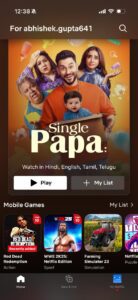
3. If it is not available, Go to search and find the game.
4. Tap on Get Game
5. It will open Google Play Store on Android or App Store in iPhone
6. Install the Game
For this process, you need a Netflix Subscription. If you don’t have subscription, follow the option 2
Option 2:
Here are the steps:
- Download XAPKS installer and the game file from the given Telegram channel: https://t.me/rdr1mobile1
- Install XAPKS
- Open XAPKS and click on install
- Tap on System File Picker
- Select the Game file (i.e. RDR-Netflix….) and tap on Install
- The Game installation process will start, it is going to take 5 to 10 minutes.
- After installation, the game may ask for update if the new version is available.
- Tap on Update
- Make sure to select the green link, if you choose the red link it may not work.
In telegram channel all the step by step tutorial is mentioned.
Note: We do not support piracy, we highly recommend you to install the game from Netflix. You can play the game with minimum subscription plan.